> ## Documentation Index
> Fetch the complete documentation index at: https://connections-b7efc2e5.mintlify.site/llms.txt
> Use this file to discover all available pages before exploring further.
# Timeout
# Command Syntax
`/timeout remove !:connection !:user :reason`
`/timeout add !:connection !:user !:duration :reason`
Parameters that start with "!" are **REQUIRED**
## Permission
Only trusted admins and the physical owner can run this command.
| Command | Example | Desc |
| ----------------- | -------------------------------------------------------------------------------------------- | ------------------------------------------------------------------------------ |
| `/timeout remove` | `/timeout remove` !:connection gameplay !:user spyei | Removes the timeout from `spyei` in the connection `gameplay` |
| `/timeout add` | `/timeout add` !:connection gameplay !:user patu !:duration 1d !:reason Too good in terraria | Adds timeout in `patu` with 1d duration with the reason "Too good in terraria" |
## Options
All options that are listen in the command syntax will be included and explained here.
Name of the connection you want to add or remove timeout in this user
The mention, id or username of the user that you want add or remove the
timeout
Duration of the timeout, in the 5s format, so 5s will be 5 seconds. The
timeout will be removed automatically after it expires
Adds a reason when timeouting or removing it from a user, e.g. "Toddy is too
sexy to play Standoff with me"
## Can't timeout
Targets you can't timeout are:
* Bots
* Any person with trusted admin or physical owner
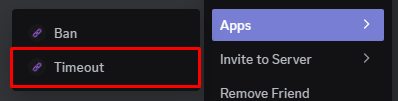
You can use the user context menu to timeout a user quickly
## Logs
When you add/remove timeout to a user, Connections will automatically log the
timeout in the logs channel
This command does not have a prefix version